In 2026, professional communication demands real-time intelligence without compromising sensitive corporate or personal privacy. Whether presenting product demos, answering technical questions during live calls, or leading executive briefings, having an AI copilot that listens, sees your screen, and remembers your context in real time is a game changer.
Our team at IT Apps LAB tested and benchmarked the top 5 real-time AI copilots and meeting assistants based on inference latency, transcription accuracy, visual OCR capabilities, and data privacy.
🏆 #1. PairHint — Best Overall Real-Time On-Device AI Copilot
Testing Notes: During our 3-week hands-on testing across 40+ live video calls, technical interviews, and executive slide presentations, PairHint delivered an unbeatable combination of speed and total privacy. Because inference runs entirely on your Mac's Neural Engine, there is zero cloud latency. It listens to both meeting speakers and your microphone simultaneously, performing instant visual OCR on whatever diagram or problem statement is displayed on screen.
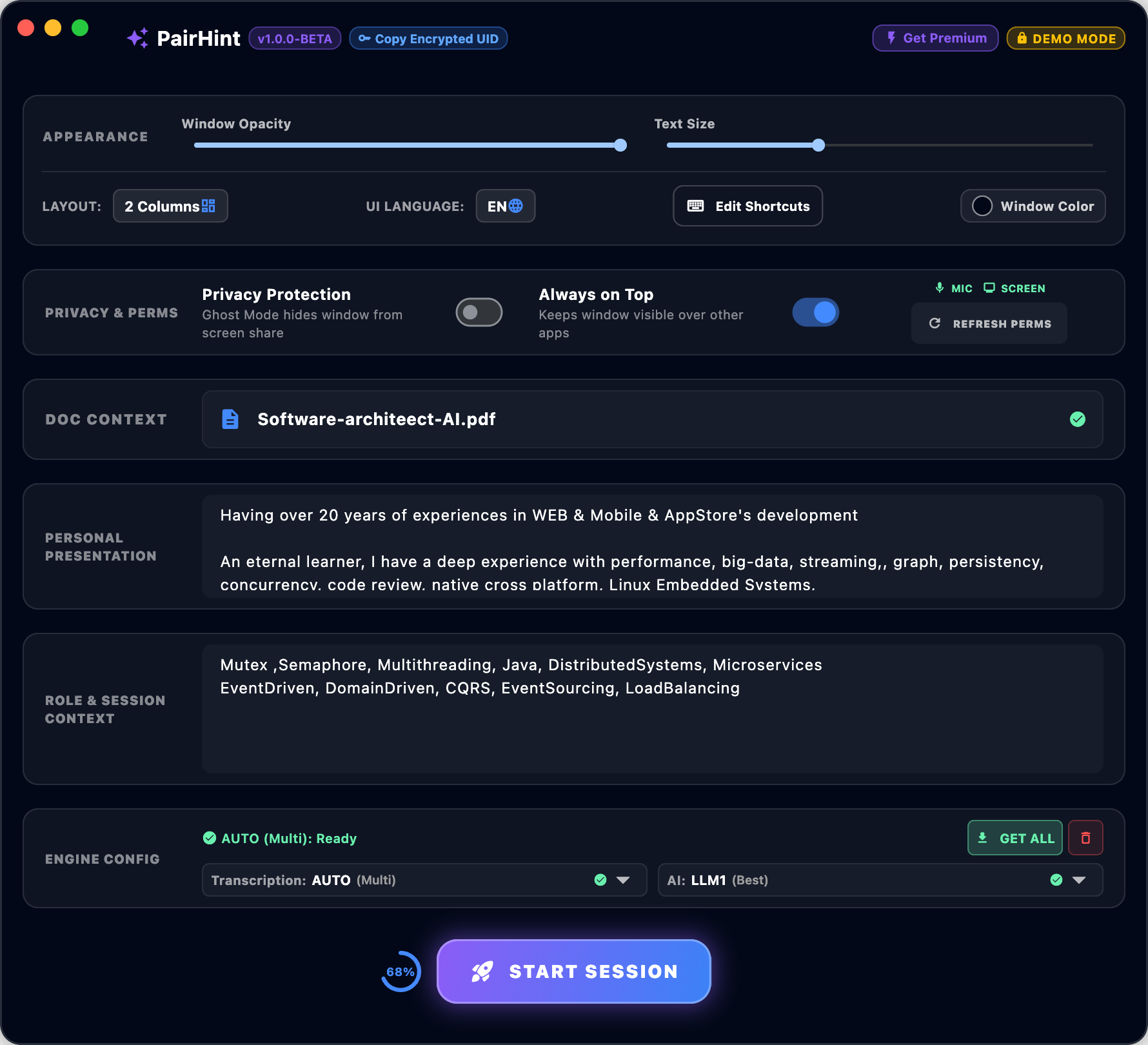
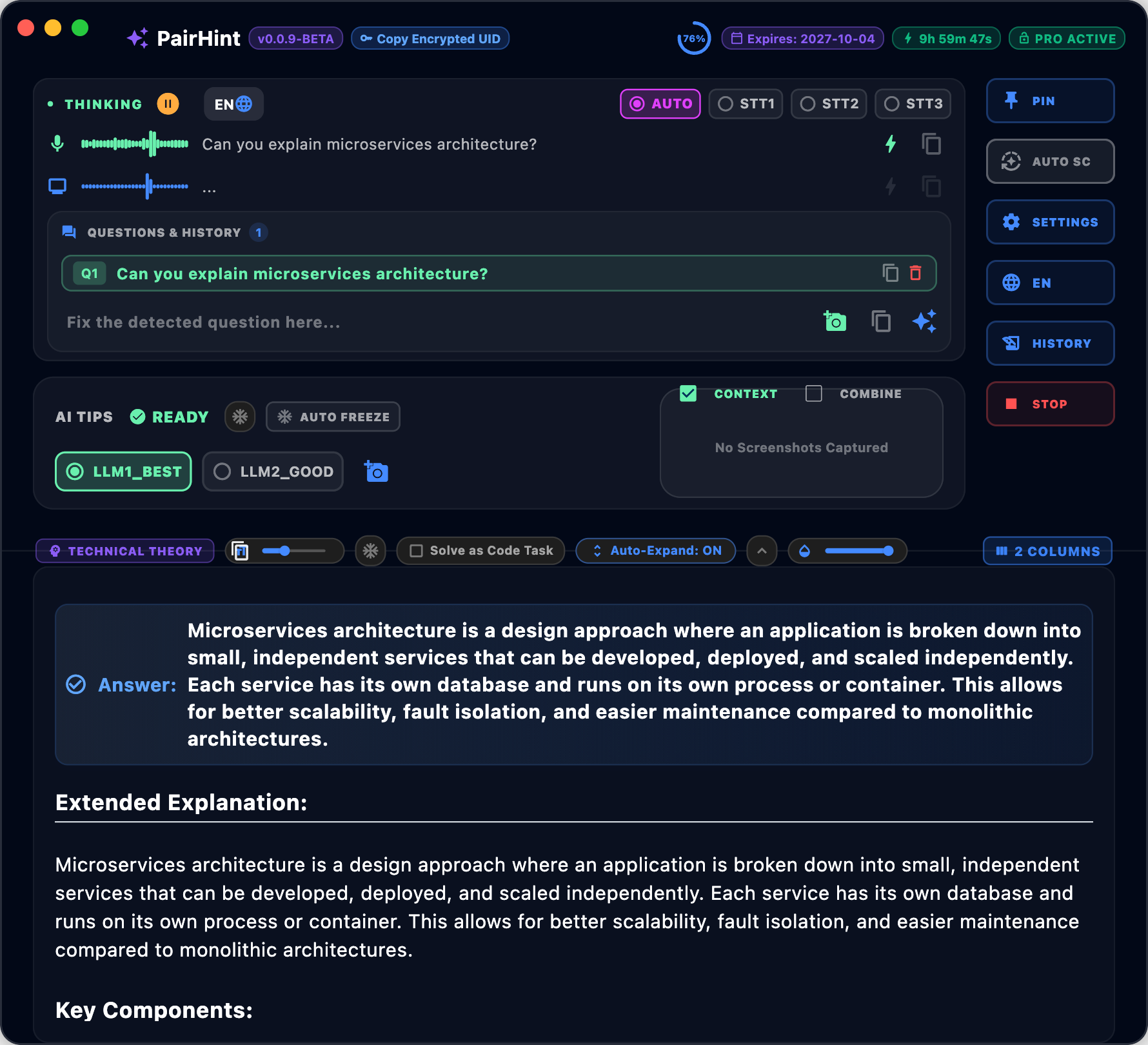
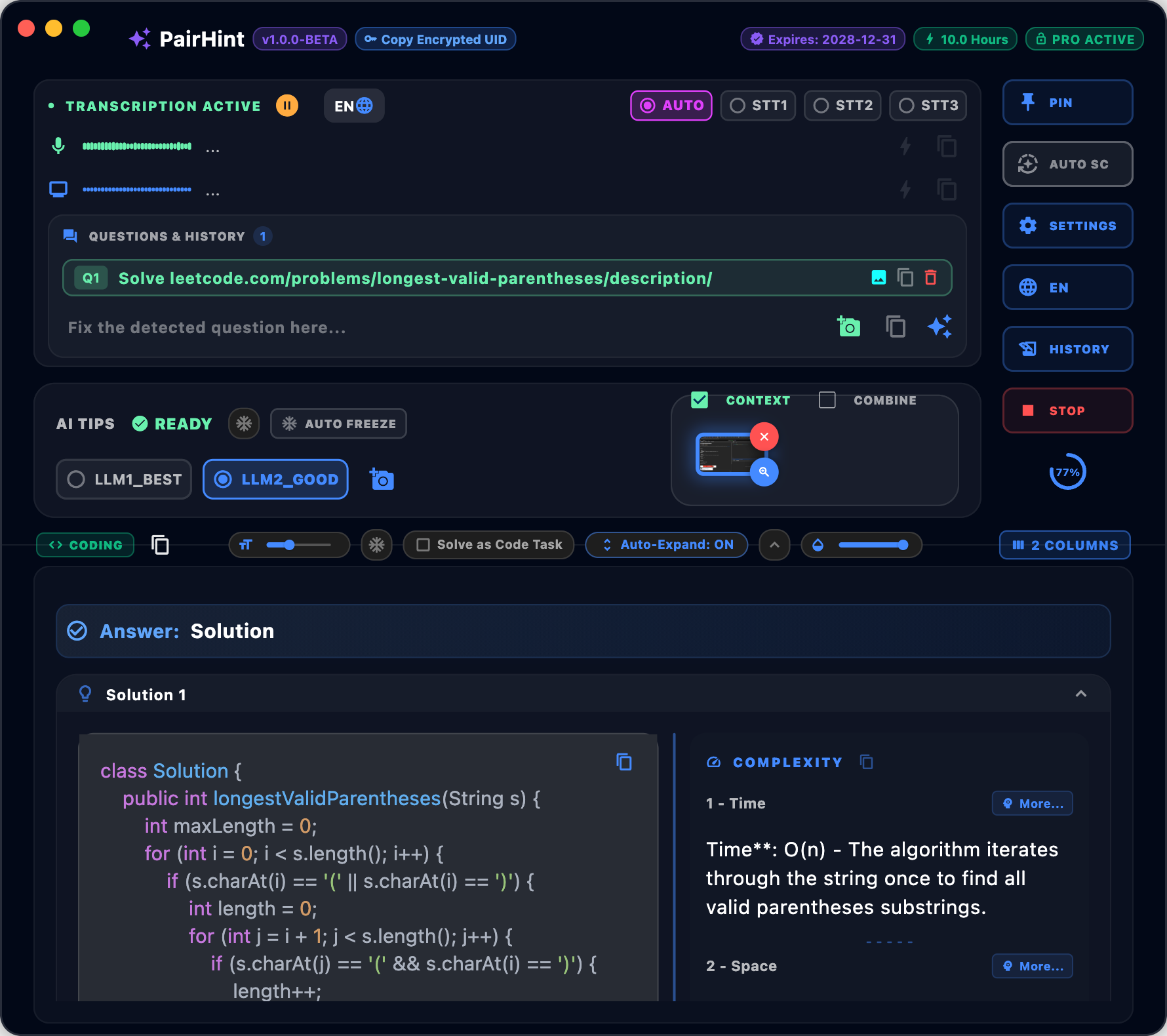
PairHint's app screenshots (Multi-LLM Context Engine, Live Speech Transcription, and Desktop Screen OCR Solver)
Why You Should Use PairHint (User Experience & Feedback)
Professionals, software engineers, and presenters choose PairHint when live conversation accuracy, instant structured problem solving, and strict data privacy are paramount. Key reasons highlighted by regular user feedback include:
- 0ms Cloud Latency & Instant Problem Solving: Immediate structured answers delivered locally as spoken context unfolds during live technical calls.
- Combined Audio & Desktop Screen Analysis: Fuses live dual audio stream speech transcription with instant desktop OCR screen capture to solve complex coding & architectural problems in real time with clean formatting.
- Total Confidentiality: Speech, screen captures, and CV/document context remain strictly inside Mac hardware memory.
- Stealth Overlay Mode: Remains completely invisible during Zoom, Google Meet, and Microsoft Teams screen shares.
What We Liked:
- 100% On-Device & Private: Zero audio, screen, or document data leaves your Mac. Perfect for strict corporate compliance.
- Dual-Stream Audio Capture: Separately transcribes your microphone and the meeting host audio simultaneously.
- Visual OCR Screen Analysis: Reads diagrams, slides, error messages, or code on screen instantly.
- Invisible to Screen Sharing: Floating ghost overlay mode stays hidden during Zoom/Teams screen shares.
What Could Be Improved:
- Hardware Requirements: Local on-device LLM inference requires an Apple Silicon Mac (M1/M2/M3/M4) with 16GB+ RAM.
- macOS Gatekeeper First Launch Alert: Because the application package is currently not signed by an Apple Developer ID certificate, macOS Gatekeeper displays a security warning alert on first launch. The official PairHint First Launch Setup Guide provides step-by-step instructions showing how to grant permission by clicking "Open Anyway" inside System Settings → Privacy & Security.
Official Link: Visit PairHint Official Website | First Launch Setup Guide ('Open Anyway')
 2. Otter.ai — Best for Automatic Team Meeting Summaries
Testing Notes: We tested Otter.ai across several multi-person team standups on Zoom and Google Meet. Otter Pilot automatically joins scheduled calls as an external participant bot, recording the meeting audio and generating real-time transcriptions along with automated bulleted summaries at the end of the meeting.
What We Liked:
- Automated Action Item Extraction: Excellent post-meeting summaries and key takeaways automatically assigned to team members.
- Multi-Speaker Identification: Accurately tags different speakers throughout long conference calls.
What Could Be Improved:
- Meeting Bot Requirement: An obvious "Otter.ai Bot" joins the participant list, which can be awkward in external client calls.
- Privacy & Cloud Dependency: Audio and transcriptions are processed on cloud servers.
- No In-Call Guidance: Designed for post-meeting notes; does not provide real-time talking points while you talk.
Official Link: Visit Otter.ai Official Website
 3. Granola — Best for Minimalist Mac AI Meeting Notepad
Testing Notes: Granola is a beautifully designed macOS app that acts as an AI-enhanced notepad. Instead of sending a bot into the call, Granola listens to system audio and allows you to type rough bullet points during the call. Once the call finishes, Granola’s LLM expands your rough notes into polished executive summaries.
Granola's app screenshot
What We Liked:
- Sleek Mac Interface: Minimalist, native macOS design with customizable note templates.
- No Bot Joined: Listens directly to system audio without inviting a participant bot.
What Could Be Improved:
- Post-Call Processing Only: Does not stream answers or offer real-time help during active conversation.
- Requires Manual Typing: Relies on your typed notes as seed context.
Official Link: Visit Granola Official Website
 4. Metaview — Best for HR & Recruiter Interview Scorecards
Testing Notes: Metaview focuses specifically on hiring managers and technical recruiters. During our recruitment test calls, Metaview captured candidate answers and automatically formatted structured interview scorecards aligned with specific competency rubrics.
What We Liked:
- ATS Integration: Seamlessly syncs candidate notes into Greenhouse, Lever, and Workday.
- Competency Mapping: Automatically categorizes candidate responses under relevant skill tags.
What Could Be Improved:
- Niche Focus: Specialized solely for HR hiring workflows rather than general meetings or sales calls.
- High Pricing Tier: Expensive seat licenses geared toward enterprise talent teams.
Official Link: Visit Metaview Official Website
 5. Fireflies.ai — Best for CRM & Sales Pipeline Automation
Testing Notes: Fireflies.ai excels at connecting meeting intelligence directly into sales CRMs like Salesforce and HubSpot. It transcribes sales calls, tracks key topic mentions (e.g. competitor names, pricing objections), and updates opportunity deal stages automatically.
What We Liked:
- Deep CRM Integrations: Logs call transcripts, sentiment scores, and follow-ups directly to Salesforce records.
- Topic & Keyword Tracking: Flags objections, pricing questions, and feature requests across team calls.
What Could Be Improved:
- Cloud Security Concerns: Transcripts are stored in cloud infrastructure, requiring strict compliance reviews.
- No Real-Time Co-pilot Guidance: Offers post-call analytics rather than live answer suggestions during calls.
Official Link: Visit Fireflies.ai Official Website
Grid 1: Features, Latency & Data Privacy Comparison Matrix
| App / Service | Primary Functionality | Inference Latency | Data Privacy | Overall Rating |
|---|---|---|---|---|
| PairHint | Real-Time Live Speech & Desktop Screen OCR Copilot | 0ms (On-Device) | 100% On-Device Local | |
| Otter.ai | Automated Meeting Bot & Post-Call Summaries | 3,000ms – 8,000ms | Cloud Server Storage | |
| Granola | Minimalist Mac AI Meeting Notepad | Post-Call Batch | Cloud LLM Processing | |
| Metaview | Recruiter Interview Scorecards & ATS Sync | Post-Call Batch | Cloud Enterprise Vault | |
| Fireflies.ai | Salesforce & HubSpot CRM Pipeline Automation | Post-Call Batch | Cloud Infrastructure |
Grid 2: Pricing, Licensing & Business Model Breakdown
| App / Service | Free Tier | Paid Monthly Tier | License / Billing Model | Best Suited For |
|---|---|---|---|---|
| PairHint | Free 10-Credit Pass | $12.00 / mo or Lifetime Pass | One-Time / Flexible Pass | Live interviews, sales & demos |
| Otter.ai | 300 min / mo limit | $16.99 / mo per user | Monthly Subscription | Team standups & transcripts |
| Granola | 25 meetings limit | $10.00 / mo | Monthly Subscription | Minimalist Mac note-taking |
| Metaview | 5 interviews trial | $48.00 / mo per recruiter | Annual / Monthly Seat | HR & recruiter hiring teams |
| Fireflies.ai | 800 min storage | $18.00 / mo per user | Monthly Subscription | Sales pipeline CRM tracking |
Community Discussion (4)
Leave a Comment
You must be signed in to leave a comment on this article.